To automate new starter paperwork, turn your forms into one digital workflow per role, send it as a single link before day one, and let software check each answer and sync it to payroll. Then automate what comes after: the work rights check result, licence expiry dates and the reminders, so nothing depends on someone remembering.
Here is the paperwork new starters in Australia need, and where each requirement comes from:
- TFN declaration (ATO). Tells you how much tax to withhold. See our TFN declaration form guide.
- Super standard choice form, and stapled super (ATO). Eligible employees must get the form within 28 days of starting. If an employee doesn't choose a fund, you pay to their stapled fund, which you request from the ATO, and to your default fund only if the ATO tells you they don't have one. See our super choice form guide.
- Fair Work Information Statement (Fair Work Ombudsman) for every new employee, plus the Casual Employment Information Statement for casuals and the Fixed Term Contract Information Statement for anyone entering a fixed term contract. Our Fair Work Information Statement guide covers all three, including when the casual statement has to be given again.
- Employment contract and policies (your business, under the award or agreement that applies).
- Photo ID (your business, to confirm who you're paying and checking).
- Work rights check with the Department of Home Affairs (VEVO) for anyone who isn't an Australian citizen. See our guide to the VEVO check for employers.
- Licences and tickets the role needs, such as a White Card or a high risk work licence.
- Bank details, needed before the first pay run.
- Payroll setup: the worker created in payroll with the details above, so the first pay is right.
This is general information, not legal advice. Facts are as at November 2026, and the sources are listed at the end.
This post is about automating the paperwork. For everything else a new starter needs, from the site induction to the 90-day review, use our new employee onboarding checklist.
Why the paperwork is worth automating
The forms aren't hard. Chasing them is. A paper pack goes out, comes back half done, someone types it into payroll, and a TFN sits in an inbox. Multiply that by every casual you hire in a busy month.
Three things make it more urgent now:
- Payday Super. From 1 July 2026, the ATO says super guarantee contributions need to reach the employee's fund within 7 business days after payday, extended to 20 business days for the first contribution for a new employee to a new fund. Missing or wrong fund details need fixing during employee onboarding, not at quarter end. Our Payday Super setup guide covers what to configure.
- Work rights. Home Affairs says it is against the law to hire a non-citizen who doesn't hold a valid visa, or to hire them to do work that goes against their visa conditions. It tells employers to check visa work conditions through VEVO, with the visa holder's permission.
- Proof. If the Fair Work Ombudsman or a client asks, you have to show what you gave, what you checked and when. Paper and inboxes make that slow.
How to automate new starter paperwork, step by step
1. Map the paperwork to each role and employment type
Start with a short list of roles, then note what changes between them:
| What changes | What it affects |
|---|---|
| Employment type (full-time, part-time, casual, fixed term) | Which Fair Work statements they get |
| Citizenship and visa | Whether you need a work rights check |
| The job itself | Which licences, tickets or screening checks are needed |
| The site or client | Policies and inductions to acknowledge |
A labourer on a casual contract and a fixed term site supervisor don't need the same pack. Writing this down once is what makes the rest automatic.
2. Build one digital workflow per role
Turn each list into a workflow: the forms, the documents to read or sign, the uploads and the checks, in order. Use digital versions of the ATO forms rather than scanned PDFs, so the answers come back as data instead of an image someone has to retype. Our guide to the electronic TFN declaration covers what the ATO accepts.
3. Send one link before day one
Send the workflow as a single link by SMS or email as soon as the offer is accepted. Workers complete it on their phone. The Fair Work statements are due before, or as soon as possible after, the employee starts, and the super choice form within 28 days, so sending everything before the first shift covers both.
4. Check the answers as they come in
Good employee onboarding software checks the data at the point of entry: a TFN that fails validation, a blank required field, a missing signature. That's where most rework comes from on paper.
5. Run the checks that need a person
Two steps shouldn't be left to the worker:
- Work rights. The worker enters their visa details. Your admin then runs the check with the Department of Home Affairs through VEVO and records the result. Australian citizens can't be checked in VEVO; Home Affairs says they can show their Australian passport or citizenship certificate instead.
- Licences and tickets. The worker uploads the card. Someone verifies it and records the expiry date. Our White Card check guide shows what that looks like for construction.
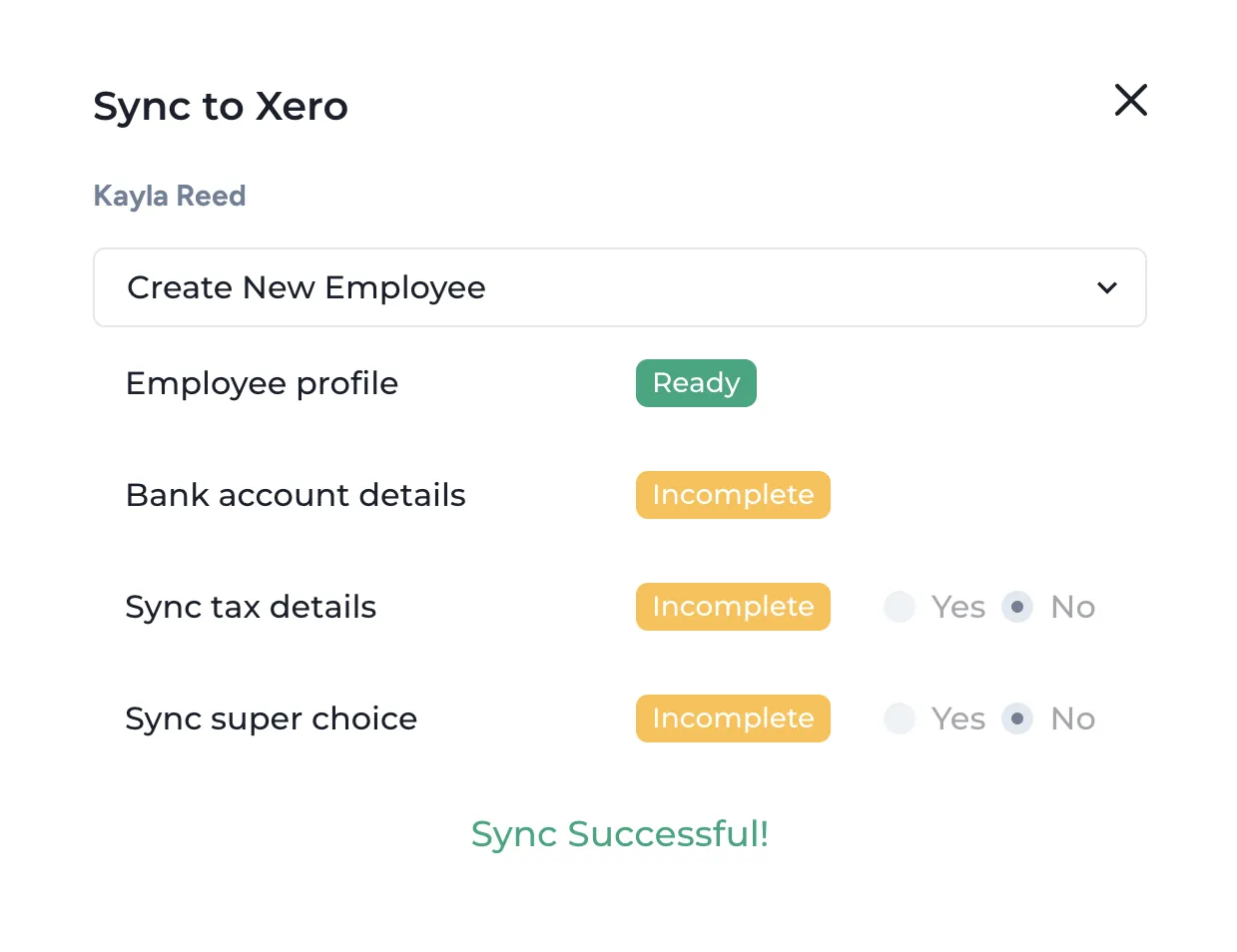
6. Sync to payroll instead of retyping
Once the data is checked, send it straight to payroll: profile, TFN declaration, super fund and bank details. Retyping is where transposed digits and wrong fund numbers creep in.
7. Automate what happens after day one
The paperwork doesn't end at the first pay run. Set reminders for:
- visa expiry dates, so you check again before they lapse
- licence and ticket expiry dates
- the Casual Employment Information Statement repeats: after 12 months for a small business employer (fewer than 15 employees), and after 6 months, 12 months and every 12 months after that for everyone else
What to keep, and for how long
| Record | Keep for | Source |
|---|---|---|
| Employee records generally | 7 years | Fair Work Ombudsman |
| TFN declaration | Until the end of the financial year after the one in which you last paid the person | ATO |
| Super choice form or ATO online summary | 5 years | ATO |
| Proof you gave each Fair Work statement (which version, when, how) | With the employee file; 7 years is a sensible default | Our suggestion |
| Work rights check result, visa expiry and conditions | With the employee file | Our suggestion |
| Licence and ticket copies with expiry dates | With the employee file | Our suggestion |
The ATO says to store TFN declarations securely and not to ask workers to send their tax details by email. The detail for each form is in the guides linked at the top.
Common mistakes when automating employee onboarding paperwork
- Digitising the mess. A PDF emailed to a new starter is still paper. If someone has to retype the answers, it isn't automated.
- One pack for every role. Casuals miss their statement, fixed term staff miss theirs, and office staff get asked for a White Card.
- Going straight to the default fund. If a new starter doesn't choose a fund, request their stapled fund from the ATO before you fall back to your default fund. Our stapled super fund guide explains how.
- An old Fair Work statement in the template. The Fair Work Ombudsman lets you email a link to the statement on its website, so link to the current version rather than attaching an old PDF.
- Treating a visa photo as a check. The check is yours to run with Home Affairs, not a screenshot the worker sends.
- Checking once. Visas and licences expire after day one. Without a reminder, nobody notices.
- TFNs and bank details in email. Keep them in your employee onboarding software or payroll, not in inboxes and texts.
How Canyou handles this
Onboarding gets them into payroll. It doesn't keep them legal to work. Canyou is employee onboarding software that does both.
- A workflow per role. Build a workflow with tasks for the user profile, TFN declaration, super choice, bank account, documents, e-sign and forms, and link it to a position so every new starter in that role gets the right steps.
- One link, completed on the phone. Workers get a link by SMS or email, or scan a QR code. No app to download and no password to set up.
- The ATO forms, checked. The TFN declaration and super choice tasks are digital versions of the ATO forms, and the TFN is verified before submission. With super stapling connected to the ATO, Canyou retrieves each new employee's stapled fund during onboarding.
- Contracts, policies and statements. Send contracts and policies for electronic signature, and share documents such as the Fair Work statements with a tick-box acknowledgment.
- Work rights checked with the Department of Home Affairs. The worker enters their visa details in a Visa details task. Your admin runs the check from Canyou, every check stays on the worker's record, and you get notice before the visa expires. See work rights checks.
- Licences tracked to expiry. Assign the licences each position needs, approve what workers upload, and send reminders at the intervals you choose. See licence and certification management.
- Synced to payroll. Send the profile, TFN declaration, super choice and bank details to Xero in one click, and new employees to MYOB and Deputy. See all integrations.
Sensitive data is stored in Australia and never sold. Employee onboarding takes around 15 minutes per worker, down from 6–10 hours, and the records are ISO audit-ready.
Try for free (no credit card required), or Book a demo and we'll set up your first workflow with you. Plans are on the pricing page.
Sources (checked 27 November 2026): ATO: TFN declaration, payer information and obligations · ATO: offer employees a choice of super fund · ATO: stapled super funds for employers · ATO: payment deadlines for Payday Super · Fair Work Ombudsman: Fair Work Information Statement · Fair Work Ombudsman: Casual Employment Information Statement · Fair Work Ombudsman: Fixed Term Contract Information Statement · Fair Work Ombudsman: record-keeping and pay slips · Home Affairs: information for employers · Home Affairs: check visa conditions online (VEVO)