JobAdder placements, onboarded and cleared to work.
Approved placements in JobAdder come into Canyou with the candidate’s details filled in. Canyou runs their employee onboarding, your team checks their work rights with the Department of Home Affairs, and your recruiters see their progress without leaving JobAdder.
Approved placements import without retyping a thing
Recruiters onboard candidates from inside JobAdder
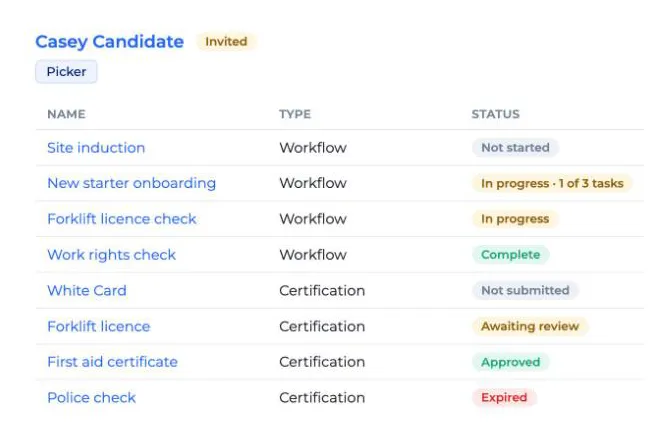
Onboarding status shown on the placement in JobAdder

Integrations
Canyou collects. Your systems receive.
Your payroll, rostering and recruitment tools stay the source of truth. Canyou does the chasing and hands over validated data, so your team never has to log in to another app.
FROM THE WORKER'S PHONE
Collect
One link, any phone
Verify
ID, visa, licence validity
Monitor
Expiries & reminders
Validated once, pushed everywhere it's needed, with an audit trail kept.
INTO THE TOOLS YOU ALREADY RUN
 Syncs into Xero Payroll
 Syncs into MYOB Payroll
 Works alongside Deputy rosteringImports placements from JobAdder
 Sends cleared-to-work status to Workforce One
 Sends cleared-to-work starters into Astute Payroll
 Brings staff in from Cloud Payroll
Setup
From approved placement, to payroll.
Connect JobAdder
An admin clicks Connect JobAdder in Canyou’s settings and approves access in JobAdder. The Onboard in Canyou button appears on your placements and candidates.
Placement approved
Approved placements show up in Canyou’s import list, or a recruiter clicks Onboard in Canyou on the placement in JobAdder.
Cleared to work
The candidate gets the workflows for their position. Your team checks their work rights with the Department of Home Affairs and Canyou tracks their licences and certifications.
Into payroll
Once they’re cleared to work, your team sends them into payroll with Canyou’s Astute Payroll or Xero integration, so nobody retypes their details.
Import
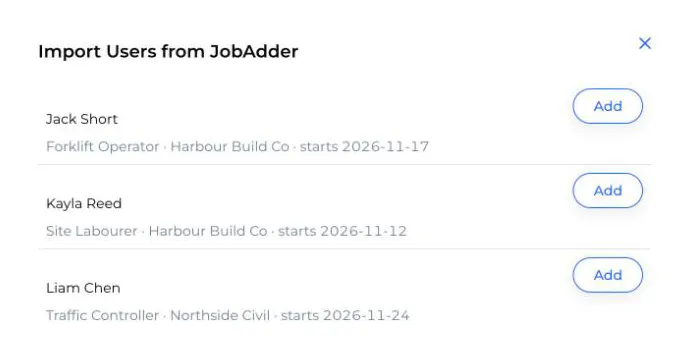
Approved placements, ready to onboard
Click Import from JobAdder on the Users page to see your approved placements, with the candidate, job title, company and start date. Choose their positions, then add them: their name, email and mobile come straight from JobAdder. See how Canyou works for labour hire and recruitment.
Placements that started in the last 90 days or start in the future
Workflows assigned from the positions you choose
Candidates already in Canyou aren’t listed, so there are no duplicates
In JobAdder
Recruiters onboard without leaving JobAdder
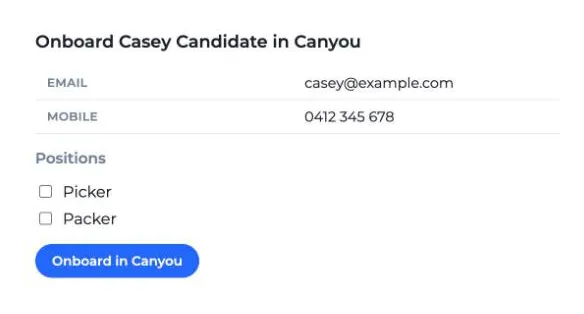
The Onboard in Canyou button opens Canyou in JobAdder’s side drawer. Recruiters tick the candidate’s positions and start their employee onboarding, with no Canyou login needed. If the candidate is already in Canyou, the drawer offers to link them instead. Read how recruiters onboard from JobAdder.
Send or resend the invite, assign a workflow or add a position
Progress shown on the button, for example Workflows 2/3 · Certifications 1/4
Onboarding complete once every workflow and certification is done
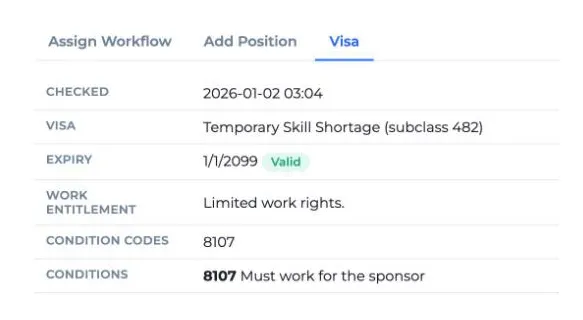
Work rights
Work rights checked from the drawer
If your business has visa checks set up and the candidate has entered their visa details, a recruiter can click Run visa check in the drawer to check their work rights with the Department of Home Affairs. The result shows the visa, its expiry, their work entitlement and any conditions. See how work-rights checks work.
Checked with the Department of Home Affairs
Visa conditions and expiry kept on the worker’s record
For JobAdder users
JobAdder runs your recruitment: candidates, jobs and placements. Canyou makes sure every candidate you place is cleared to work before their first shift.
- Import approved placements into Canyou with the candidate’s name, email and mobile filled in
- Onboard candidates from an Onboard in Canyou button on placement and candidate records
- See each candidate’s onboarding status in JobAdder, from workflows to certifications
- Canyou never edits your candidates or placements in JobAdder
Questions we get asked
Anything else, start a live chat or book a 30-minute call with our Australian team.
Book a 30-minute demo →What does the JobAdder integration do?
It brings your approved JobAdder placements into Canyou for employee onboarding. You can import them from the Users page, or recruiters can onboard a candidate from the Onboard in Canyou button in JobAdder and follow their progress there.
What does Canyou read from and change in JobAdder?
Canyou reads approved placements from the last 90 days onwards, with each candidate’s name, email, mobile, job title, company and start date. The only thing it changes in JobAdder is the onboarding status shown on the Onboard in Canyou button.
Do recruiters need a Canyou login?
No. The drawer in JobAdder works without one. To show the recruiter as the inviter, give them a Canyou admin login with the same email as their JobAdder login.
Will importing create duplicate users?
No. Candidates whose email is already used by someone in your Canyou business aren’t listed for import, and in the JobAdder drawer a matching email asks you to link the existing user instead.
Does the JobAdder integration send workers to payroll?
Not directly: JobAdder brings placements into Canyou. Once a worker is cleared to work, your team sends them into payroll with Canyou’s Astute Payroll or Xero integration.
Clear every placement to work before the first shift
Work rights checked with Home Affairs, licences tracked to expiry and payroll details collected, at about 15 minutes per worker.
No credit card required · Cancel any time · Australian support 🇦🇺